by Steve Sorbo | Mar 1, 2024 | Uncategorized
Does your organization or some financial website require you to create a new password periodically? This practice was recommended long ago, but some organizations haven’t kept up with current recommendations that discourage such policies. If you’re bound by a password expiration policy, you can use this article to encourage your IT department or financial institution to update its approach to password security.
The rationale behind password expiration policies was that if an attacker were to steal a password database and decrypt some passwords, they would work for only a limited period, lessening the risk of unauthorized access. Even if an attacker gained access to an account, they could remain undetected only if they didn’t change the password, and that access wouldn’t last indefinitely.
Over time, security experts realized that the problem wasn’t so much how long an attacker could remain undetected but allowing users to set weak passwords that could be decrypted. It turns out that users often choose weaker passwords when they know they will have to change them, perhaps by tweaking a previous password for easier memorization. This fact hasn’t been lost on attackers, making it easier for them to figure out future passwords. In other words, attempting to increase security by requiring users to change passwords paradoxically reduces security.
The National Institute for Standards and Technology (NIST) is a US government agency that develops cybersecurity standards and best practices for the federal government that large corporations and other institutions tend to follow. In 2017, NIST changed its guidelines to say, “Verifiers SHOULD NOT require memorized secrets to be changed arbitrarily (e.g., periodically).” In a FAQ, NIST explains:
Users tend to choose weaker memorized secrets when they know that they will have to change them in the near future. When those changes do occur, they often select a secret that is similar to their old memorized secret by applying a set of common transformations such as increasing a number in the password. This practice provides a false sense of security if any of the previous secrets have been compromised since attackers can apply these same common transformations.
Of course, if there’s evidence of unauthorized access or a breach of the password database, all passwords should be invalidated and everyone should be required to create a new password immediately—that’s entirely different than requiring passwords to be changed on a schedule.
Interestingly, NIST also doesn’t recommend password composition requirements—such as requiring the password to contain a letter, number, and special character—because users tend to devise predictable techniques to meet such requirements, such as appending an exclamation point to every password. Instead, NIST encourages longer passwords because a long password that’s easily remembered and typed can be stronger than a shorter password composed of random characters. Password managers can generally create both types.
If you’re forced to change a website password periodically, it’s easiest to use a password manager to generate and enter a new strong password, and you won’t have to memorize the new password. For the very few passwords you must remember and type manually, aim for longer passwords that won’t trip up your fingers while typing or require numerous switches of iPhone uppercase and numeric keyboards. To aid memorization, perhaps consider choosing words for your password from categories with many possibilities. For instance, if your initial password is gouda-purple-1989-New-York, the next one could be cheddar-black-2011-Des-Moines. Both are strong in their own right, but only you would know the categories used for each portion.
(Featured image based on an original by iStock.com/designer491)
Social Media: Security experts no longer recommend password expiration policies that require users to change their passwords periodically. Here’s why.

by Steve Sorbo | Mar 1, 2024 | Uncategorized
The near-ubiquity of videoconferencing is a lasting effect of the pandemic. The ease of gathering a group virtually usually more than makes up for the downsides. Despite that, many people still appear in video calls with low-resolution, poorly lit video that makes the call less effective.
A better webcam is an easy way to improve your video, and the best readily available webcam may already be in your pocket. That’s because you can use your iPhone and its high-quality cameras as a wired or wireless Mac webcam, thanks to Apple’s Continuity Camera technology.
Your Apple gear likely meets the Continuity Camera system requirements. You need an iPhone XR or later (all iPhones introduced in 2018 or later) running at least iOS 16 and a Mac running macOS 13 Ventura or later. Both must be signed in to the same Apple ID.
You’ll want a mount that holds your iPhone in landscape orientation (horizontally) at the top of your Mac’s screen, with its rear cameras facing you. The first such mounts for laptops and desktops came from Belkin, but numerous manufacturers now sell inexpensive alternatives that have different industrial designs and support iPhones that can’t use MagSafe. Continuity Camera can drain your battery, so it’s worth plugging in a charger cable or getting a screen mount that also holds a MagSafe charger; look on Etsy for options, such as this one.
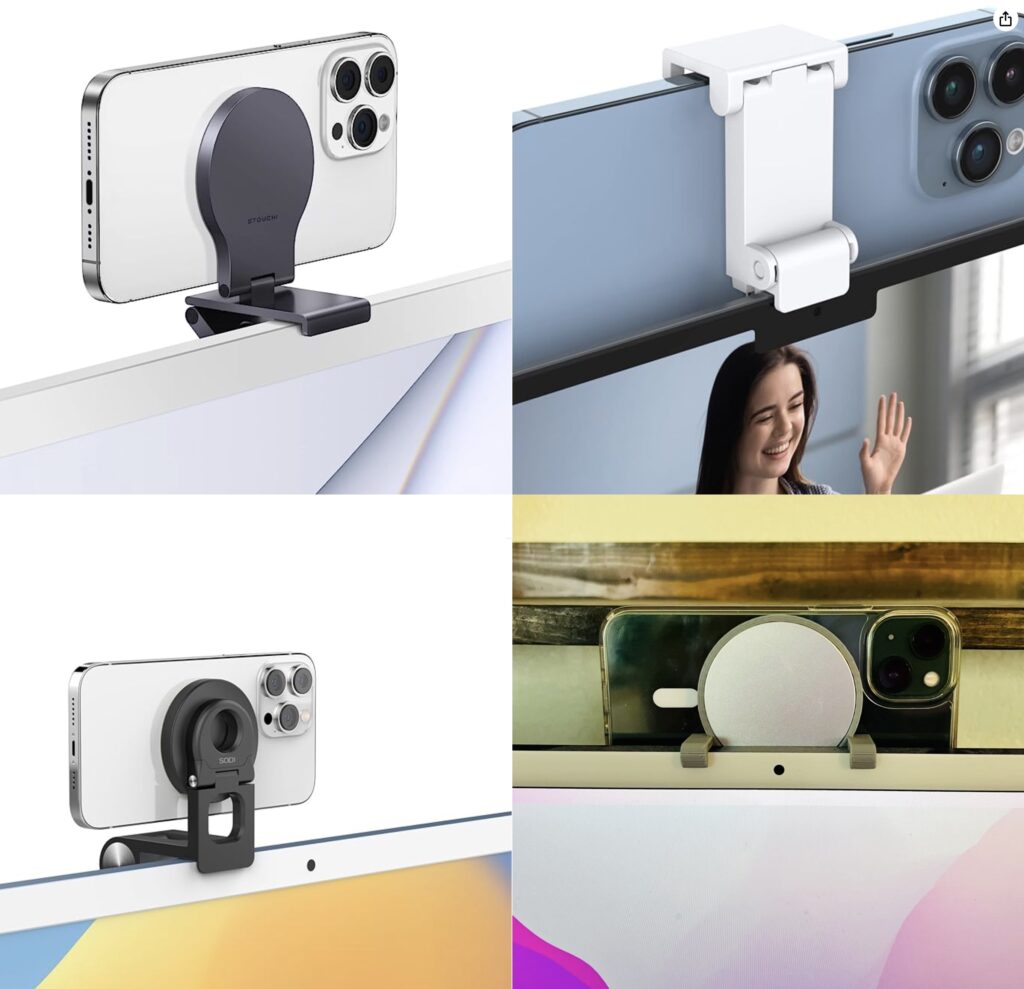
Although the samples above show the iPhone’s cameras in the upper-right corner, you can rotate the iPhone to position the cameras in the lower-left corner, which may put them more in line with your eyes and improve eye contact.
(Technically, you can put the iPhone anywhere—a tripod behind your screen would also work—and it doesn’t have to be in landscape orientation. However, apps detect the iPhone as a webcam automatically only when it’s in landscape orientation, and if it’s below or to the side of your screen, the video angle will likely be problematic. You can also take your iPhone off its mount and walk around with it as long as you stay in Bluetooth range of your Mac.)
When the iPhone is locked and in position, its camera and microphone become available to videoconferencing apps like FaceTime, Zoom, and Webex. Your app may start using the iPhone as a camera automatically, but if not, look for a menu or icon that lets you choose the desired camera. Similarly, you can use the iPhone’s mic as your audio input for the call, although the Mac’s built-in mic, AirPods, or other mic may offer equally good or better audio quality.
For the most part, the iPhone acts like a standard webcam. After you end the call, remove it from the mount to use it normally again. Should you need to check something on your iPhone during the call, you can remove it from the mount and either tap the Pause button or just unlock it—your video (and audio, if you’re using the iPhone as a mic too) will pause. To resume, lock and remount your iPhone. You may want to warn the other people on your call first in case something goes wrong and you get disconnected.
Receiving a phone call is a similar situation. Answering the call on the iPhone pauses the audio and video for the videoconference until you end the call, lock the iPhone, and mount it again. You may also be able to answer the call on the Mac, but that also pauses the audio and video, and you may need to choose the iPhone as your camera again afterward.
Ultimately, using your iPhone as a webcam is remarkably easy—Continuity Camera just works in our experience. The only tricky part is finding the screen mount and charger that work best with your Mac and usage patterns.
(Featured image by Belkin)
Social Media: Many of us spend significant chunks of the workday on video calls, and the best way to improve your onscreen look is with a better webcam, which you can probably find in your pocket. Learn how to use your iPhone as your Mac’s webcam here.

by Steve Sorbo | Mar 1, 2024 | Uncategorized
Generative AI chatbots like ChatGPT, Microsoft’s Bing/CoPilot, and Google’s Gemini are the vanguard of a significant advance in computing. Among much else, they can be compelling tools for finding just the right word, drafting simple legal documents, starting awkward emails, and coding in unfamiliar languages. Much has been written about how AI chatbots “hallucinate,” making up plausible details that are completely wrong. That’s a real concern, but worries about privacy and confidentiality have gotten less attention.
To be sure, many conversations aren’t sensitive, such as asking for a recommendation of bands similar to The Guess Who or help writing an AppleScript. But increasingly, we’re hearing about people who’ve asked an AI chatbot to analyze or summarize some information and then pasted in the contents of an entire file. Plus, services like ChatPDF and features in Adobe Acrobat let you ask questions about a PDF you provide—it can be a good way to extract content from a lengthy document.
While potentially useful from a productivity standpoint, such situations provide a troubling opportunity to reveal personally sensitive data or confidential corporate information. We’re not talking hypothetically here: Samsung engineers inadvertently leaked confidential information while using ChatGPT to fix errors in their code. What might go wrong?
The most significant concern is that sensitive personal and business information might be used to train future versions of the large language models used by the chatbots. That information could then be regurgitated to other users in unpredictable contexts. People worry about this partly because early large language models were trained on text that was publicly accessible online but without the knowledge or permission of the authors of that text. As we all know, lots of stuff can unintentionally end up on the Internet.
Although the privacy policies for the best-known AI chatbots say the right things about how uploaded data won’t be used to train future versions, there’s no guarantee that companies will adhere to those policies. Even if they intend to, there’s room for error—conversation history could accidentally be added to a training model. Worse, because chatbot prompts aren’t simple database queries, there’s no easy way to determine if confidential information has made its way into a large language model.
More down to earth, because chatbots store conversation history (some let you turn off that feature), anything added to a conversation is in an uncontrolled environment where at least employees of the chatbot service could see it, and it could be shared with other partners. Such information could also be vulnerable should attackers compromise the service and steal data. These privacy considerations are the main reason to avoid sharing sensitive information with chatbots.
Adding emphasis to that recommendation is the fact that many companies operate under master services agreements that specify how client data must be handled. For instance, a marketing agency tasked with generating an ad campaign for a manufacturer’s new product should avoid using any details about the product in AI-based brainstorming or content generation. If those details were revealed in any way, the agency could be in violation of its contract with the manufacturer and be subject to significant legal and financial penalties.
In the end, although it may feel like you’re having a private conversation with an AI chatbot, don’t share anything you wouldn’t tell a stranger. As Samsung’s engineers discovered, loose lips sink chips.
(Featured image by iStock.com/Ilya Lukichev)
Social Media: Privacy concerns are starting to crop up around conversations held with AI chatbots. For safety’s sake, never share anything with a chatbot that you wouldn’t tell a stranger.

Recent Comments