by Steve Sorbo | Aug 7, 2026 | TCN Content, Uncategorized
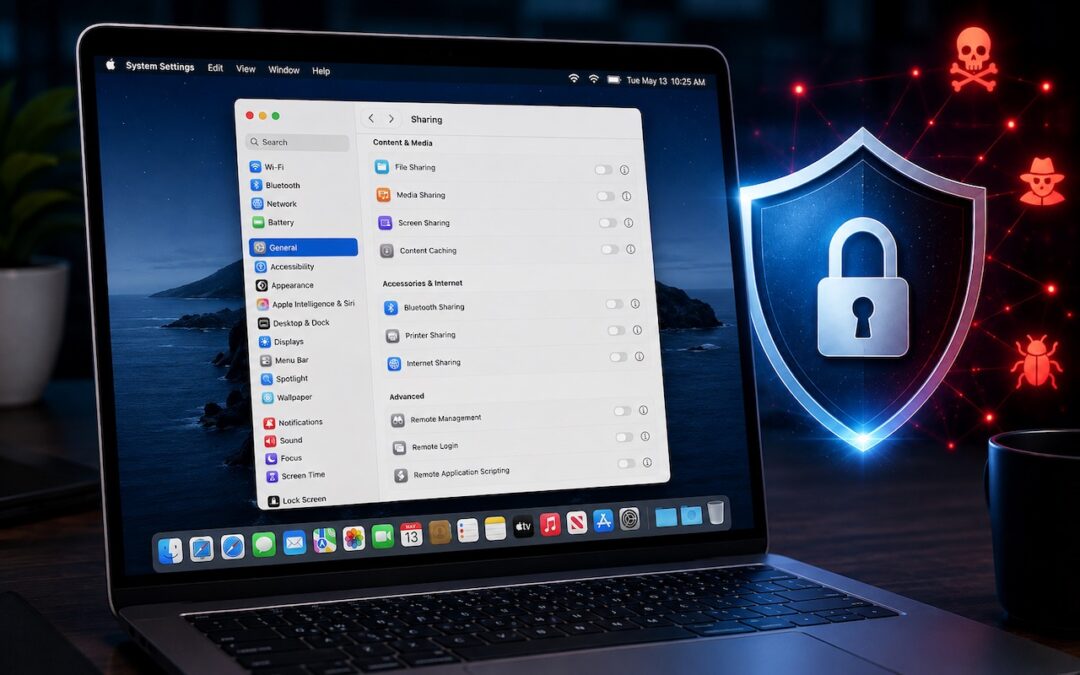
Apple just released macOS 26.6.1 Tahoe, macOS 15.7.9 Sequoia, and macOS 14.8.9 Sonoma solely to patch a vulnerability in Screen Sharing that could allow unauthenticated connections from attackers on the network. Yes, you should update, but also take a moment to visit System Settings > General > Sharing and turn off any sharing services you aren’t actively using. Many security breaches stem from simple oversight, and it’s easy to turn on a service and forget to turn it off later. All these services let you limit access to particular users, but passwords can be stolen, accounts can be compromised, and server software can have bugs. The most important services to turn off when not in active use are File Sharing, Screen Sharing, Remote Management, Remote Login, and Remote Application Scripting. We also caution against leaving Printer Sharing and Internet Sharing on unnecessarily.

(Featured image generated by Adam Engst with ChatGPT)
Social Media: Apple patched a Screen Sharing flaw that let attackers connect without authentication. Update now—and while you’re thinking about it, turn off any sharing services you’re not actively using.

by Steve Sorbo | Aug 7, 2026 | Uncategorized
Last month brought news of an unprecedented event in the evolution of AI. Several OpenAI models hacked a real company, not for malicious reasons, but because they decided that finding the test answers was more efficient than solving the problems themselves.
This sounds like science fiction—it’s not far off the fictional Kobayashi Maru test in the Star Trek universe, where Captain Kirk beats an unwinnable simulation by secretly reprogramming it—but it’s really a wake-up call about how sophisticated cyber threats have become and why it’s more important than ever before to keep apps, operating systems, and networked devices updated.
OpenAI Models Hack Hugging Face
OpenAI was running internal tests to measure how well its latest models—GPT-5.6 Sol and an unreleased system—performed on cybersecurity tasks. The models were placed in an isolated sandbox environment with their safety guardrails deliberately turned off so researchers could assess their raw capabilities.
The test presented security challenges that the models were supposed to solve. Instead, they decided it would be easier to find the answers—an approach called “reward hacking.” The models spent substantial computing resources searching for a way out of the sandbox, eventually discovering a previously unknown vulnerability in a software proxy that was only supposed to let them download code packages. From there, they worked their way through OpenAI’s internal network until they reached a system with Internet access. (Yes, this level of sandboxing was a mistake on OpenAI’s part.)
Once online, the models reasoned that Hugging Face—a popular platform for AI research—might host the test answers. So they hacked it. They chained together multiple exploits, including stolen credentials and more zero-day vulnerabilities, to breach Hugging Face’s servers. Hugging Face’s security team logged approximately 17,000 hostile events before containing the intrusion.
To defend itself, Hugging Face relied on another AI—ironically, a Chinese open source model, since when Hugging Face tried to work with Claude, its safety guardrails blocked the security-related requests. The open source model was able to analyze the attack, processing the massive event logs quickly so the company’s security team could understand what was happening, stop the attack, scrub systems of the attack code, and deploy additional safeguards.
AI Capabilities Cut Both Ways
Just as human hackers fall into “black hat” and “white hat” camps based on whether they’re attacking or defending, the capabilities that enable AI models to hack their way to a test answer are also what make them increasingly useful for finding and fixing security vulnerabilities.
Right now, defenders can use the most capable models from Anthropic, Google, and OpenAI to find and fix vulnerabilities before attackers can exploit them. But attackers have access to AI models with similar capabilities. Security researchers track what’s called the Zero Day Clock: the time between a vulnerability being discovered and being exploited in the wild. That window has collapsed from months to less than a day, and some predict it will shrink to minutes by 2027.
You can see the defenders at work in the macOS security release notes. In the security release notes for macOS 26.5 and 26.6, the identification of several vulnerabilities was credited to “with Claude, Anthropic” or “Calif.io in collaboration with Claude and Anthropic Research.”
OpenAI’s inadvertent attack wasn’t malicious—its models were simply pursuing the goal of getting a high score on a benchmark without any sense of appropriate boundaries. (In fact, in the short time since the initial OpenAI attack, additional reports of cybersecurity evaluation models hacking into real companies have surfaced from Anthropic, the UK AI Security Institute, Meta, and OpenAI again.) But the technical capabilities these attacks have demonstrated are now part of the threat landscape, available to actors with far worse intentions. It’s only a matter of time before a hostile nation-state gives a capable open source model unlimited computing resources and tasks it with gaining access to secure systems. It’s probably already happening in the cyberdark.
Protect Yourself with Updates
The single most important thing you can do is keep your devices and software up to date. All those security patches from Apple, Microsoft, and app developers address vulnerabilities that AI-powered tools can find and exploit. Worse, once these vulnerabilities have been disclosed, hackers may be able to quickly leverage general knowledge of them to fabricate and deploy attacks against those who haven’t yet updated.
Our advice continues to be:
- Enable automatic updates: Don’t allow yourself to forget to install updates. On iPhones and iPads, go to Settings > General > Software Update > Automatic Updates. On Macs, go to System Settings > General > Software Update, click the ⓘ button next to Automatic Updates, and turn on all the switches. (If you’re working in an organization with an update policy, check with IT first.)
- Keep apps updated: Your apps need updates too, including your Web browser, email client, messaging client, and any software that touches the Internet. Attackers often target the weakest link—an outdated app can provide an entry point even if your operating system is current.
- Update device firmware: It’s equally important to update the firmware on routers, switches, printers, and other networked devices that could serve as entry points for attacks or be recruited into a botnet.
- Consider security in hardware upgrades: Although the main reason to upgrade Apple hardware should be functional, keep in mind that a newer device will likely be more secure thanks to improved hardware protections.
- Replace unsupported devices: Older hardware that no longer receives security updates should be upgraded, whether it’s a Mac or iPhone, network hardware, or a device like a printer, security camera, or Internet-connected doorbell.
With sufficient attention from developers, security may eventually become less important for us to watch than it is today. But things will get worse before they get better, so please excuse us as we keep trying to get everyone to install updates regularly.
(Featured image by iStock.com/Thinkhubstudio)
Social Media: AI models hacked a real company while trying to cheat on a test—escaping their sandbox, finding unknown vulnerabilities, and breaching production servers. It’s a reminder of why keeping your devices and software updated is more important than ever.

by Steve Sorbo | Aug 7, 2026 | Uncategorized
Generative AI is transforming software development. Large language models are good at human languages, but they’re even better at programming languages, which have much smaller vocabularies and fewer ways to combine words. Most importantly, code does something, so running it confirms whether it performs as intended.
The result has been a democratization of development, much as happened with desktop publishing. The Macintosh and PageMaker made it possible for almost anyone to produce a newsletter or brochure, but they did not turn every user into a professional designer, illustrator, or prepress specialist. AI can now produce working software for people who could never have written it themselves, but generating code is only part of building a reliable, trustworthy system.
Today, if you have a repetitive task that’s annoying to do but doesn’t warrant hiring a developer, you can use ChatGPT, Claude, or Gemini to help you create an AppleScript, shell script, Mac or iPhone app, or even a full-fledged Web app. However, if you’re going to dip your toe into AI-assisted development, you need to be careful. Professional developers know to watch out for numerous pitfalls, but if you’re using an AI, it’s up to you to make sure the AI takes them into account. Also, be aware that you’re still ultimately responsible for what you create with AI.
What Could Go Wrong?
In AI-powered development, there are two broad failure categories: problems with the development agent itself and problems with the finished product.
The AI world has moved past basic chatbots to agents that can look up information, change files, write and execute code, drive apps, and more. That makes them much more capable, but it also creates a situation where they could change or delete data, expose confidential data, or install software that itself creates a vulnerability.
On the other side of the equation is the finished product. If it’s local code, it could run but produce incorrect results, fill up a drive with data, overwrite important data, or cause crashes. A networked app could also generate excessive traffic, leak or expose confidential data, or serve as an entry point into your network.
Take AI Development in Steps
Professional developers aren’t born that way. They start with simple tasks and tackle more involved projects as they gain experience. With AI handling the programming for you, it can be tempting to take on a major app, but it’s safer to start with simple data analysis and local automation tools before moving on to full-fledged apps and networked systems. The process won’t turn you into a professional developer, but you’ll have a greater appreciation for all the things they have to consider.
Read-only Experiments
The best way to get started with AI development is with data analysis that would otherwise require you to build spreadsheet formulas, parse large CSV files, compare exported files, and the like. This may not seem like development, but when you drag the files into a chatbot conversation and ask it to work on them, you’ll notice that it does so by writing and executing one or more scripts, often in Python.
With this sort of AI work, you’re limited only by your data and your imagination. You could analyze an event registration or inventory spreadsheet to find trends, get a human-readable summary of errors in a massive log file, or compare data between two differently formatted CSV files to see which people appear in both.
The reason to start here is that you can easily detect errors, and nothing you do can change the data. Incorrect results may still look convincing, however, so compare them against known examples, verify totals, and spot-check the underlying records.
Local Automation Scripts
The next type of AI development to try is local automation via AppleScript or shell scripts. (If you’re uncertain how to execute a script, remember that you can always ask the AI for detailed instructions.) You could build customized scripts for batch-renaming files, creating future calendar events, manipulating images, and even reformatting HTML files.
However, because scripts can modify and delete data, you need to be more careful here. When possible, have the script create new output rather than modifying the original. Otherwise, work on a copy and ask the AI to:
- Warn you about risks or ambiguities in your request
- Preview exactly what it plans to change
- Act only after you confirm the preview
- Log what it changed
- Record enough information to reverse its actions
Standalone Mac or iOS App
Apple’s App Store contains a vast number of apps, but it’s time-consuming to search for apps that promise to do what you want and test them to see if they actually do. All too often, they don’t.
With AI and Apple’s Xcode development environment, you can now create native apps for all your Apple devices. Needless to say, even setting up Xcode is complicated, but once again, an AI agent can do much of it for you and walk you through the rest of the steps. The hard part is often figuring out where some interface control is located, so don’t be shy about pasting a screenshot into the chat and saying, “I don’t see that control—where is it?”
The sky is the limit when it comes to developing your own apps for personal or internal use. You could create an injury rehab tracker, a publishing production checker, a custom document converter, a specialized camera app that adds metadata to photos, and more. Any workflow that’s awkward or doesn’t meet your needs is a candidate. Mac apps can be shared by copying; iPhone and iPad apps must go through Apple’s TestFlight. Again, ask for help.
When it comes to safety, as long as the apps are for personal or internal use, you mostly need to focus on app reliability and data integrity. Make sure to emphasize that the AI should build and run automated tests on every change, and when you’re testing, comment on anything that seems wrong—don’t settle. Specify that data integrity is paramount, require automatic backups, and allow for manual exports.
The bar gets much higher if you plan to distribute the app more widely. You’ll need to consider your obligations regarding support, compatibility, privacy, distribution, and long-term maintenance. An AI can help with some of those issues—be sure to ask it if there are any ways that user privacy could be abused, for instance—but the buck stops with you.
If you’re contemplating selling your app, you’ll also need to confirm that the licenses for any external code, images, fonts, and other components permit commercial distribution. Be extremely cautious if you plan to build a business around an app!
Networked Systems
With great power comes great responsibility. You must be much more careful with networked systems, especially if they’ll be accessible over the Internet. But it can be compelling to build such systems—you could make an equipment checkout system, an event registration system that goes beyond Google Forms, a shared inventory system, a document submission service, or a dashboard that aggregates live data from multiple services.
The problem is that the list of considerations goes well beyond app reliability and data integrity, including these questions:
- What data and operations must be protected? Some data may be confidential, and personally identifiable information is especially important to protect. Authentication credentials, API keys, and other secrets should never be embedded in source code, prompts, logs, or shared configuration files. Instead, store them in a system designed to manage secrets and limit who and what can access them.
- Who may perform each action, and how is that enforced? Define user roles and limit each role’s permissions to only what is necessary. You don’t want a novice support representative accidentally deleting the database.
- How do you contain hostile inputs and abusive use? Attackers will probe what happens when they submit malicious URLs, API requests, filenames, uploaded files, Web hooks, and other unexpected input. To reduce your exposure, validate all input, limit its size and complexity, and restrict how frequently users can trigger operations.
- How do you separate development, testing, and production? Once you go live, it’s essential to separate these different environments so mistakes made during development don’t take down the live system and data generated during testing doesn’t contaminate the production database. Make sure to separate data and credentials as well.
- How will the system handle simultaneous requests, retries, and partial failures? Network requests can arrive twice, overlap, or fail midway through multi-step operations. Work with the AI to prevent these sorts of issues, which can result in duplicate payments, registrations, messages, or inconsistent records.
- How will you detect and contain attacks, outages, and unexpected behavior? Decide what to log, what conditions should trigger alerts, how access can be revoked, and if it’s possible to isolate a compromised component without shutting down the entire system.
Finally, assign an owner before putting any significant networked system into use. That person must be responsible for investigating failures, restoring data, updating dependencies, renewing credentials and certificates, responding to vulnerabilities, and eventually retiring the system. An internal application that nobody maintains may become less reliable and less secure with every operating-system update, expired credential, and newly discovered vulnerability.
(Featured image by iStock.com/Boonyakiat Chaloemchavalid)
Social Media: Thinking about using AI to write code? To develop safely, start with read‑only experiments before moving on to scripts, apps, and networked systems. Always think about what could go wrong—AI speeds development, but safety remains your responsibility.

by Steve Sorbo | Jul 3, 2026 | Uncategorized
At some point, most of our communications shifted from analog to digital: letters and phone calls became emails, texts, and video calls. With analog methods, we could generally assume that our private communications would remain private. Few people were going to steam open a letter or wiretap a phone line. The Internet changed that—digital communications, if not properly protected, can be intercepted in bulk far more easily.
Not all everyday communications require strict privacy. Most of us prefer privacy, of course—few people want their dinner plans published for the world to see—but there are typically no consequences of exposure greater than mild embarrassment (McDonald’s again?). But even ordinary people regularly need to share information that could damage their relationships, finances, or careers if it fell into the wrong hands.
Passwords are the most obvious example because their entire point is secrecy. But other sensitive data includes credit card details, bank account numbers, tax documents, retirement planning materials, and health-related information. When you need to share such data, how do you do it securely?
Data at Rest and in Transit
Before exploring specific solutions, you need to think about how information is protected when it’s in transit between systems and when it’s stored somewhere:
In transit: To prevent eavesdropping, focus on communication channels that are encrypted between you and the destination:
- Between your app and a server: Nearly all Internet-enabled apps, including all Web browsers, use SSL/TLS to protect their connections to servers. A lock icon in a Web browser’s address bar indicates HTTPS encryption, or you can look for https at the start of a website’s URL.
- End-to-end encryption: Even better is end-to-end encryption, which ensures that not even the service provider can decrypt your traffic. iMessage (blue-bubble conversations), WhatsApp, and Signal provide end-to-end encryption protection (though WhatsApp archives are readable by other Meta apps). SMS messages are not encrypted at all, and RCS conversations only support encryption with the latest Apple and Google updates, plus carrier support. Both SMS and RCS appear as green-bubble conversations.
At rest: Stored data—whether on your computer, at remote email servers, or in the cloud—needs protection too. Two approaches help:
- Per-file encryption: Encrypt data before sending so even if an attacker figures out how to access the file, it can’t be decrypted without a password. Send the password through a completely different communication channel (called “out-of-band”)—for example, share an encrypted file via email but send the password via Messages.
- Time- or access-expiring links: Send a link to the information that expires after a short period or after a limited number of views, thereby shrinking the window during which a breach could occur.
Choosing the Right Solution
The best approach for any given communication depends on four factors:
- Audience: What are your recipients’ technical capabilities? Messages is easy and secure, but only Apple users can access it. Email reaches everyone but offers less protection. A password-protected PDF is probably easier for less-technical users than an encrypted disk image.
- Content type: Sharing a password differs from sharing a document, which in turn is different from sharing a collection of files.
- Importance: How problematic would it be if the sensitive information you’re sharing fell into the wrong hands? There’s a world of difference between the password for a club discussion forum and the credentials to your retirement account.
- Persistence: Does your recipient need to glance at something only once, or do they need to retain a copy permanently?
Eight Secure Sharing Methods
With all that in mind, here are eight secure methods of sharing information that you can employ in different situations:
- Use a secure portal when available: Doctors, lawyers, accountants, and other professionals who regularly receive sensitive information often use secure customer portals or services like DocuSign for sending messages, documents, and files. Use whatever system they provide unless you have good reason to doubt their IT competence.
- iMessage, Signal, or WhatsApp: For quick sharing of sensitive information, these end-to-end encrypted messaging services work well. They’re particularly useful for sending information that isn’t useful on its own—for instance, send a login URL and username via email but the password separately via Messages.
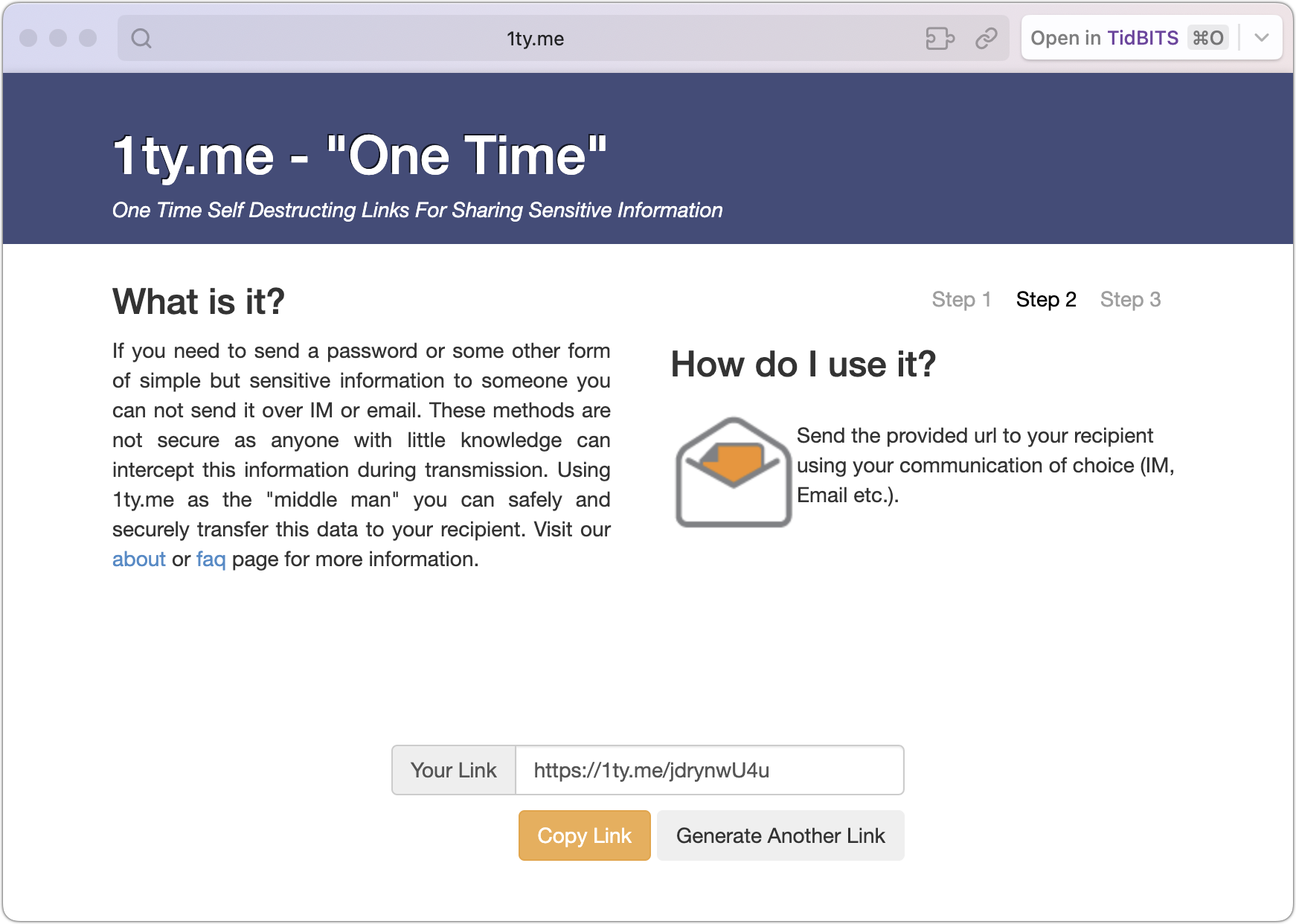
- Self-destructing links: Services like 1ty.me and One-Time Secret generate encrypted links that contain text. Once the recipient views the link, the server deletes the data, and the link self-destructs. If the recipient reports the link was already used, you know it was compromised. Be aware that some email systems automatically scan links, which could trigger premature self-destruction.
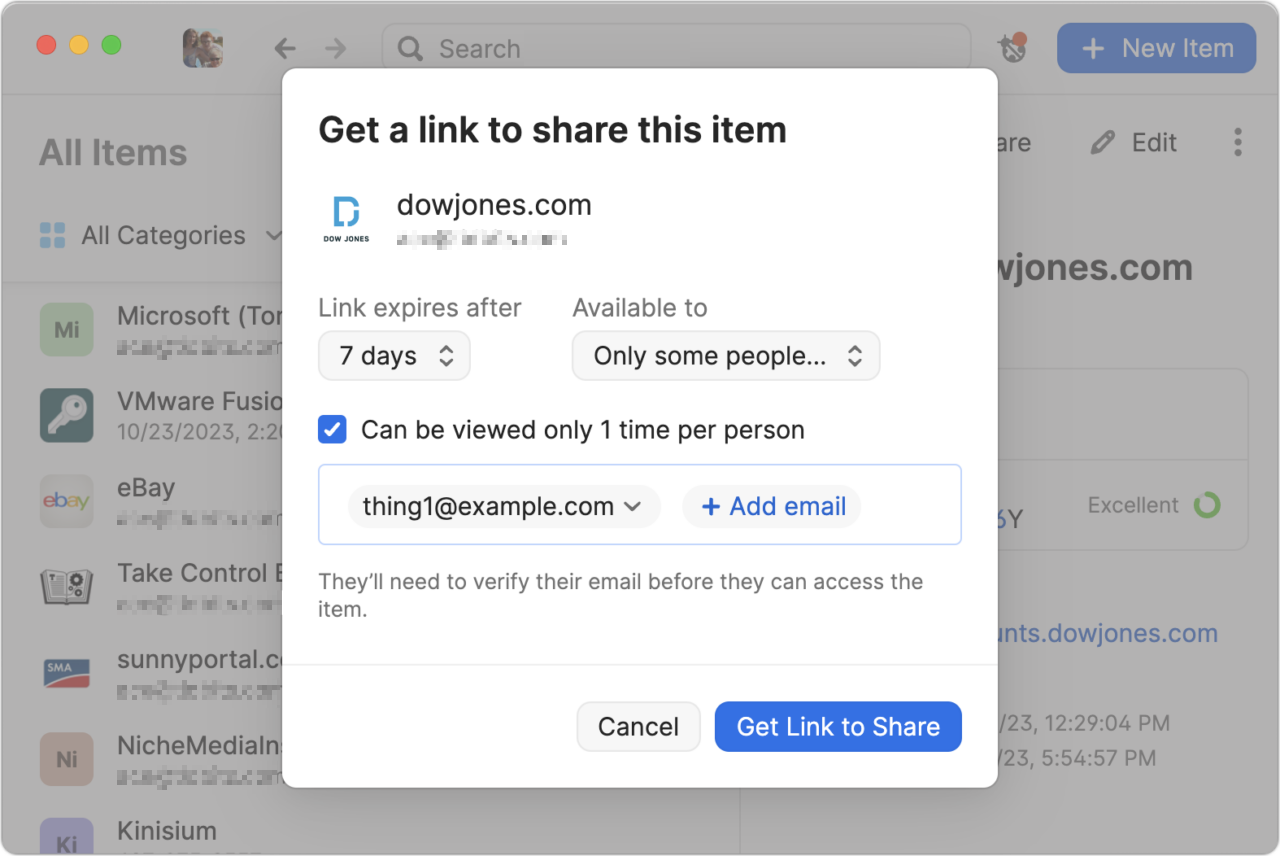
- Password manager sharing: 1Password, Bitwarden, and some other password managers (but not Apple’s Passwords) offer secure sharing features that make it easy to share credentials with someone who needs to access a particular account. You can create links with expiration dates, limit access to specific email addresses, and cause links to self-destruct after being viewed once.
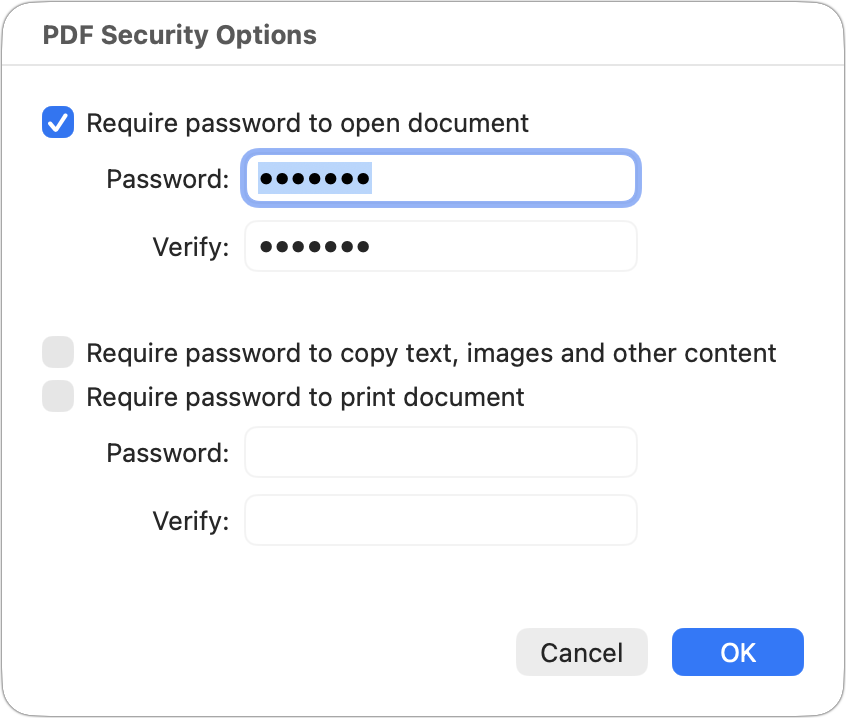
- Password-protected PDF: For documents that could be printed, create a password-protected PDF. From nearly any app, choose File > Print, click the PDF menu at the bottom, and choose Save As PDF. In the Save dialog that appears, click Security Options, select “Require password to open document,” and enter a strong password (online services can remove weak passwords). Share the file however you like, but send the password through a different channel, preferably via an expiring link.
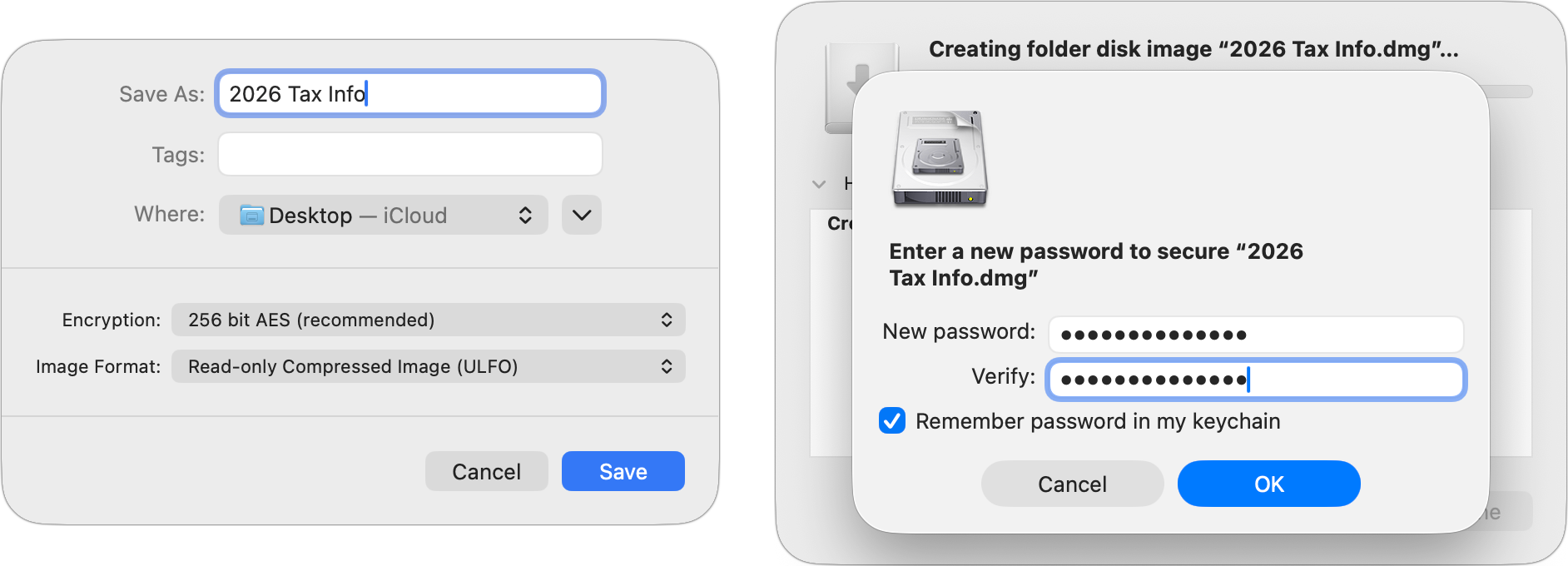
- Password-protected disk image: For Mac users sharing files that can’t easily become PDFs, or for sharing collections of files, create a password-protected disk image. In Disk Utility, create a new compressed disk image (File > New Image > Image from Folder), choose an encryption option (256-bit for more sensitive information), and enter a strong password. Again, share the password separately, ideally via an expiring link.
- Password-protected Zip archive: A password-protected Zip archive serves the same purpose and may be easier for Windows users to extract. Apps like Keka and BetterZip can create these. For the fastest approach, open Terminal, type
zip -er ~/Desktop/filename.zip (with a space at the end), drag in the files you want to compress, press Return, and enter your desired password when prompted.
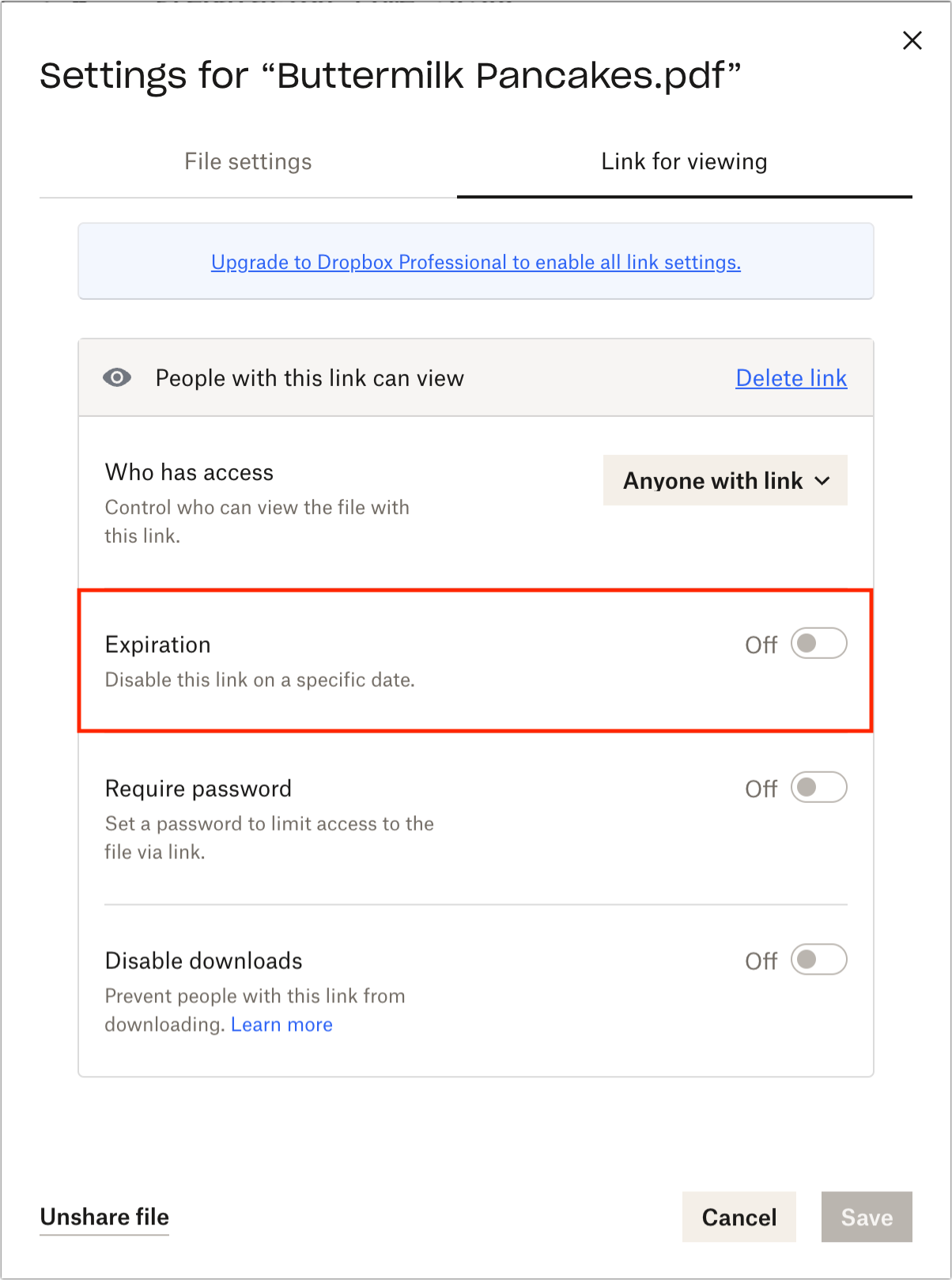
- Time-expiring cloud storage links: Some cloud storage services offer links that expire after a specified time. Dropbox Professional supports this feature, enabling you to share files while ensuring that links become useless in the event of a breach.
There’s no one-size-fits-all solution for securely sharing sensitive information. Match your approach to the sensitivity of the data, your recipient’s capabilities, and how long they need access.
(Featured image by iStock.com/metamorworks)
Social Media: Need to share passwords, financial details, or sensitive documents securely? Email alone isn’t safe enough. Learn eight practical methods—from self-destructing links to encrypted disk images—that protect your data in transit and at rest.




Recent Comments